For internal IT and ops teams

Know what expires next, and who is dealing with it.

Faybex tracks the domains, TLS certificates, licences, insurance and vendor contracts your team is on the hook for, then emails a reminder in time to act. The reminders are scheduled jobs sent by a worker on a cron - they do not depend on anyone opening the app.

  • Read a domain's expiry date from RDAP and a TLS certificate's from the live handshake, instead of typing dates in
  • Reminders at the lead times you pick - 90, 30, 7 days - sent in your timezone
  • See the last day you can still cancel, not just the day it renews

The free plan tracks up to 10 renewals. No card, and nothing to uninstall if you decide against it.

Due nextOverview
  • example.comDomain - registrar renewal
    in 6 days
  • *.internal.exampleTLS certificate - auto-read
    in 21 days
  • Endpoint protectionLicence - auto-renews, 30 days' notice
    cancel by 14 May
  • Employers' liabilityInsurance - renews yearly
    in 58 days

An illustration of the layout, not a screenshot, and not anyone's real data. The pill colours are the app's own: red for overdue or due within the week, amber for a renewal or a cancellation window closing, grey for the quiet ones.

What it does

Built for the person who gets the phone call.

Most teams this size track renewals in a spreadsheet, with a couple of calendar invites on top and one person's memory holding the rest together. That works until the person is on leave.

It finds the dates for you

Paste a domain and Faybex reads its registration expiry from RDAP. Paste a hostname and it reads the TLS certificate's expiry from the live handshake. Point it at your own Cloudflare account and it imports the certificate expiries for every zone it can see.

Reminders are jobs, not guesses

Every reminder is written to the database as a scheduled job and sent by a worker on a cron. Nothing is calculated when someone happens to open the app, so nothing is missed because nobody did.

Cancel-by, not just renew-by

Record a contract's notice period and Faybex works out the last day you can still get out of it, then reminds you before that date - not before the renewal you have already been charged for.

One place, four ways to look at it

An overview that ranks what needs attention, a board, a list with filters and tags, and a month or week calendar. Search everything from anywhere with Ctrl/Cmd-K.

Every send is on the record

Activity shows what was sent, to whom, and what happened to it - including bounces and complaints, which suppress the address rather than being retried forever. You can prove a reminder went out.

It fits how a team actually works

Invite people as admin, member or read-only viewer; remind a whole group at once; escalate to a manager when a renewal is left unactioned; keep a renewal private on a shared workspace. All of this needs Teams - Free and Individual Pro are single-seat plans, so Teams is the only plan on this page that lets a second person in.

The categories it ships with, so you are not bending a generic to-do list into shape:

  • Domain
  • SSL
  • Licence
  • Contract
  • Subscription
  • Insurance
  • Warranty
  • Lease
  • Permit
  • Membership
  • Mobile / phone
  • Passport
  • MOT
  • Road tax
  • TV licence

See it

You are not really choosing between us and a competitor.

You are choosing between this and the spreadsheet. So here is the spreadsheet's problem, and here is what the app actually looks like - no sign-up needed to judge it.

These are the real interface with sample data - not mock-ups, not retouched, and not anyone's real renewals.

  • It cannot email you. A spreadsheet is a record of what you already knew.
  • It has no idea which renewal auto-renews, or when the notice period closes.
  • Nobody owns a row. When the person who maintained it is on leave, so is the process.
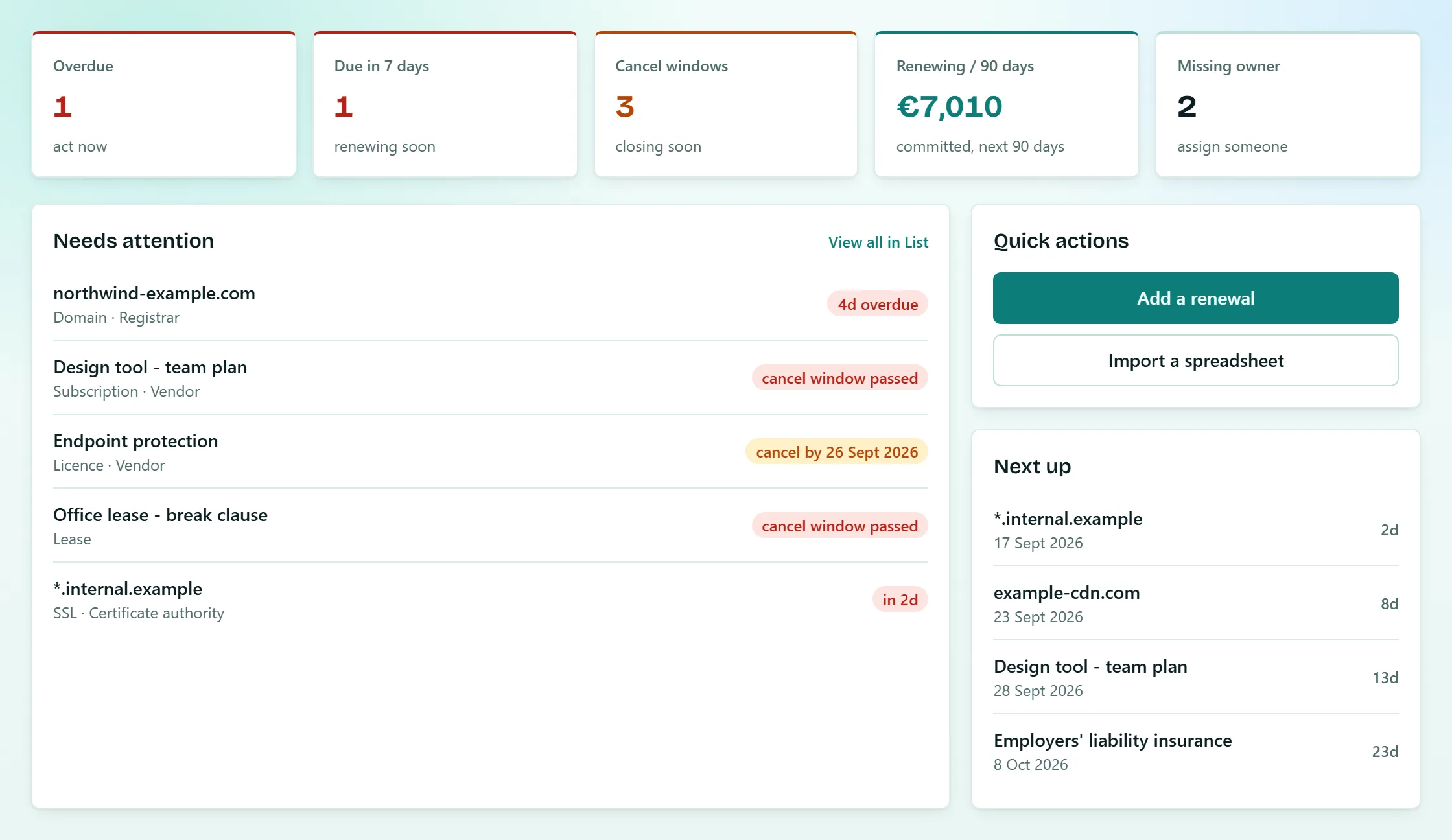
The Faybex overview screen. A row of tiles reads: Overdue 1, act now; Due in 7 days 1, renewing soon; Cancel windows 3, closing soon; Renewing in 90 days, 7,010 euros committed; Missing owner 2, assign someone. Below, a Needs attention list shows a domain 4 days overdue, a subscription and a lease whose cancellation windows have already passed, a licence to be cancelled by 26 September, and a TLS certificate due in 2 days. A side panel offers Add a renewal and Import a spreadsheet, above a Next up list of the four nearest dates.
The overview. What is overdue, what renews this week, and - the part a spreadsheet cannot do - which cancellation windows are closing, and what the next ninety days will cost.
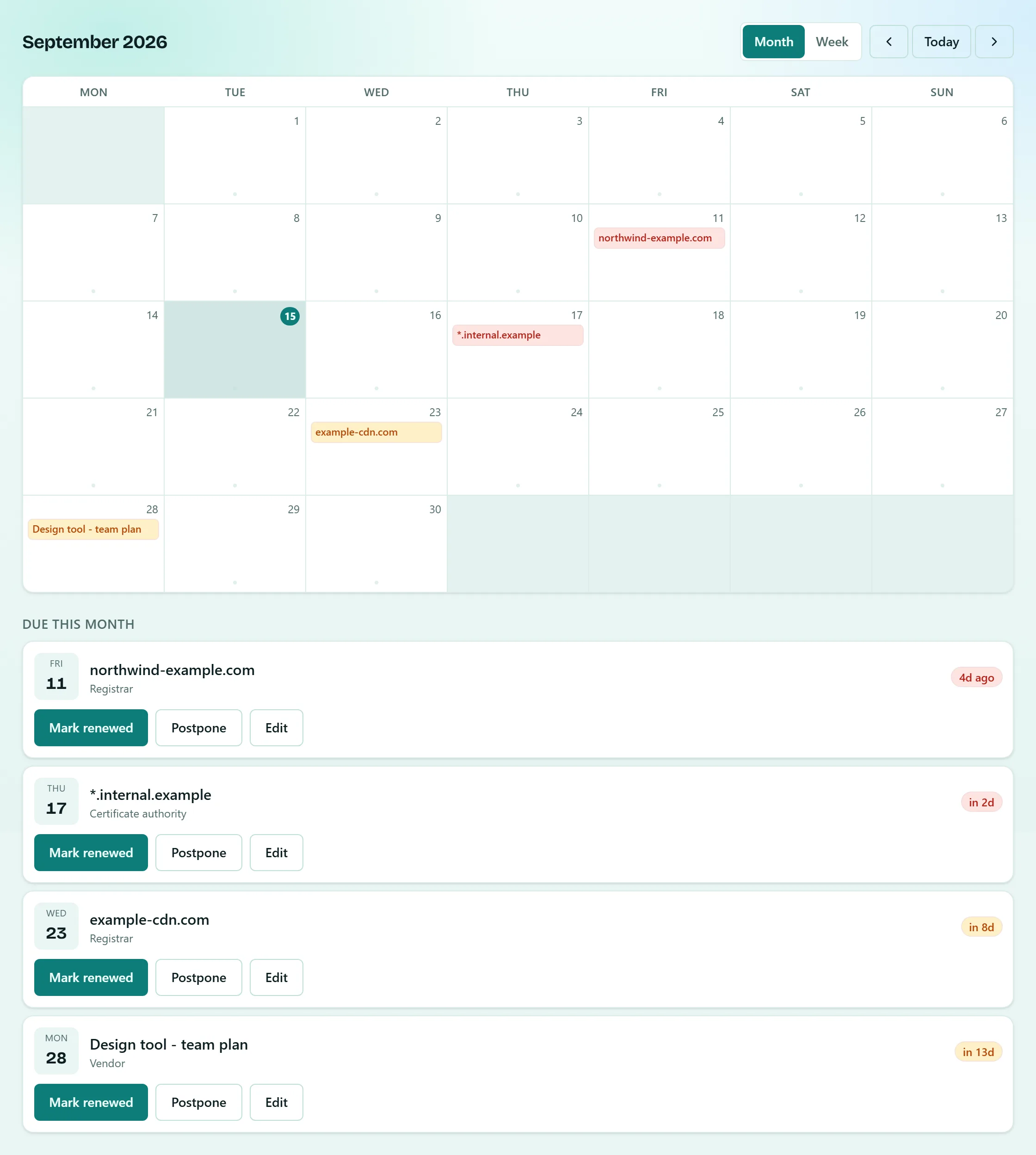
The Faybex calendar in month view for September 2026, with today ringed and four renewals marked on their dates, each coloured by urgency. Below the grid, a Due this month list gives each renewal a Mark renewed, Postpone and Edit button.
The calendar. The month at a glance, then the same renewals as a list you can act on - mark renewed, postpone, edit - without opening anything. Subscribe your own Google, Apple or Outlook calendar to the same data if you would rather it lived there.
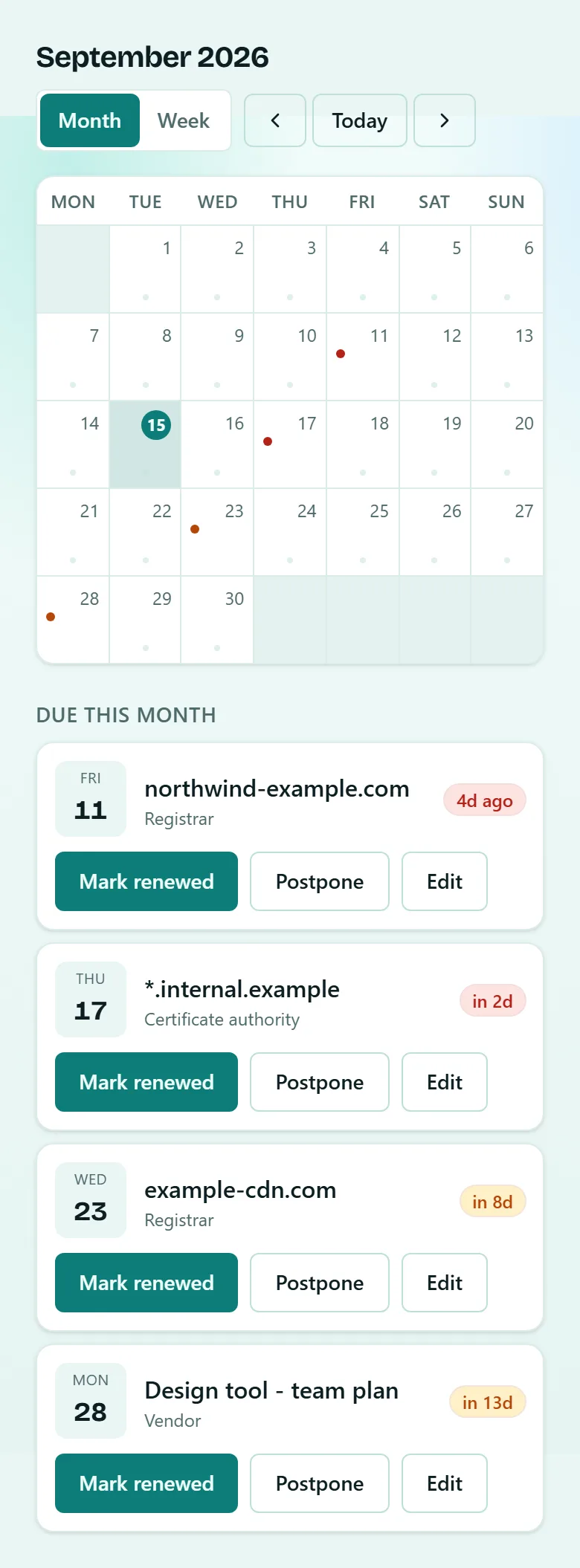
The same Faybex calendar on a phone-sized screen. The full seven-column month grid for September 2026 fits the width, with Monday to Sunday headings, today's date ringed, and coloured urgency dots on the 11th, 17th, 23rd and 28th. Beneath it, a Due this month list stacks four cards - northwind-example.com 4 days ago, *.internal.example in 2 days, example-cdn.com in 8 days and a design tool team plan in 13 days - each with its own Mark renewed, Postpone and Edit buttons.
The calendar, on a phone. The whole month still fits the screen - no pinching, no sideways scrolling - and the Due this month list keeps its full-size Mark renewed, Postpone and Edit buttons. Every screen reflows to a phone rather than dropping features.
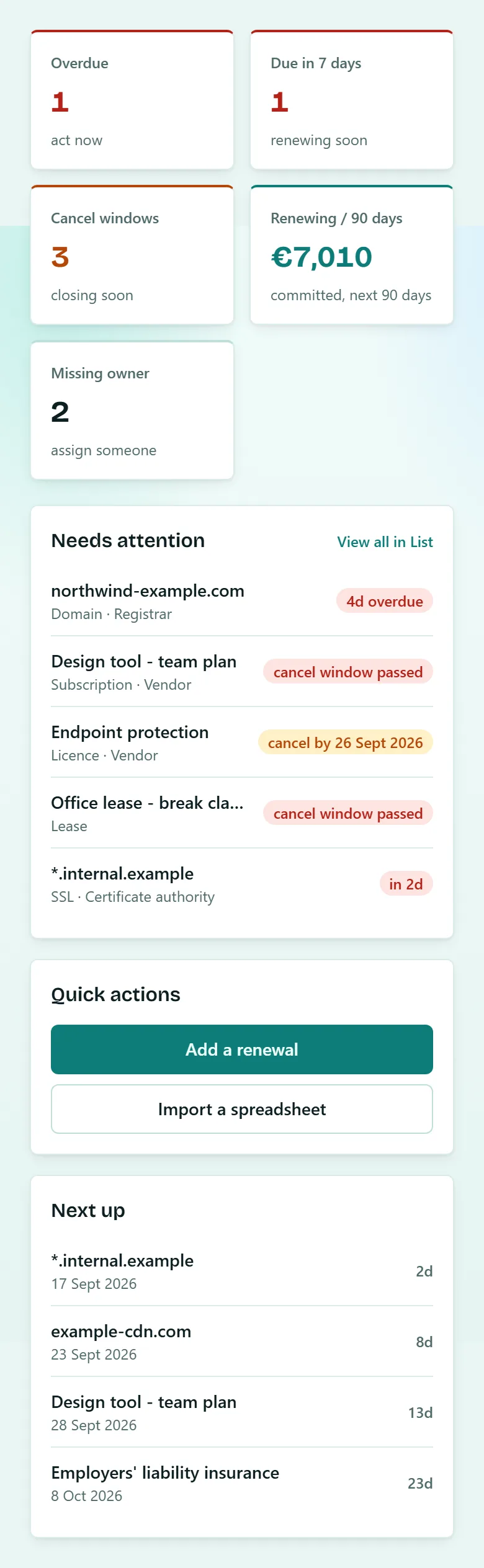
The same Faybex overview on a phone-sized screen. The status tiles reflow to two columns and the Needs attention list stacks beneath them, with the same labels and urgency colours.
The overview, on a phone. What is overdue, what renews this week, and - the part a spreadsheet cannot do - which cancellation windows are closing. Not a cut-down version: every screen reflows rather than dropping features, so these are the same tiles, the same urgency colours and the same actions you get on a laptop.

How it works

Three steps, then it is someone else's problem. Ours.

Step 1

Put in what expires

Type it, paste a domain or hostname and let Faybex read the date, or import the spreadsheet you already keep. Four fields is enough to start: what, when, which category, who to tell.

Step 2

Pick your lead times

One renewal can have several - 90 days out for the budget conversation, 30 for the paperwork, 7 for the chase. Faybex writes each one as its own job in your timezone, then leaves them alone.

Step 3

The worker does the rest

A cron-triggered worker claims and sends the due reminders, retries what fails, and refuses to send the same one twice. Whether anyone opened the app that week makes no difference.

Plans

Start on the free plan. Stay on it if it is enough.

Start on the free plan with your own renewals in it. That is a better basis for a decision than anything we could put in a sales deck.

Free

€0per month

No card, and no trial that quietly ends

Enough to put your real renewals in and see whether the reminders land.

Includes:

  • Up to 10 active renewals
  • Email reminders at the lead times you choose
  • Repeat schedules - monthly, quarterly, yearly or custom
  • Timezone-aware sending
  • Domain and TLS certificate expiry look-up
  • Calendar feed and export, any time
Start free

Individual Pro

€4.99per month

or €49 / year - two months free

For one person tracking more than a handful.

Everything in Free, plus:

  • Unlimited active renewals
  • Early access to new Pro features
Ask about this plan

Teams

Most teams

€6.99per seat / month

or €69 / seat / year - two months free

For an IT or ops function where more than one person needs to see the list.

Everything in Pro, plus:

  • 2-25 seats, billed per seat
  • Roles: admins, members and read-only viewers
  • Groups - remind a whole rota at once
  • Manager escalation when a renewal is left unactioned
  • Import a spreadsheet; export whenever you like
  • Slack, Microsoft Teams, webhooks and an inbound API
Ask about this plan

Enterprise

Let's talk

Priced against what you actually need

More than 25 seats, or a procurement process with its own opinions.

Everything in Teams, plus:

  • No seat ceiling - Teams stops at 25
  • Set up and invoiced by hand, not self-serve
  • Anything beyond that is a conversation, not a feature list
Contact us

Prices in euros, VAT inclusive. Yearly billing is ten months' worth for twelve.

Security & data protection

Built to answer the questions procurement will ask.

Your renewal data is contract and vendor information, so it is held in the EU, isolated in the database rather than in application logic, and exportable the day you want it back.

Where your data lives
Supabase Postgres hosted in the EU (Ireland), for every customer.
Tenant isolation
Row-level security on every table, enforced by the database itself rather than by application code.
Private renewals
Inside a shared workspace a renewal can be marked private - its title and detail stay with the people you choose.
In transit
TLS throughout, HSTS, and a restrictive content security policy on every surface.
Access control
Password, magic link or Google. Two-factor authentication with an authenticator app on every plan, free ones included. API keys and recovery codes are stored only as one-way hashes.
Delivery you can audit
Every reminder is a persisted job with a per-job idempotency key, so a retry cannot double-send. Owners and admins get a per-workspace audit trail.
Backups
Daily encrypted backups with an automated weekly restore-check that restores them and verifies the data came back.
Payments
Paddle acts as merchant of record. No card details reach Faybex.
Your data, on your terms
Export everything whenever you like, in a format you can open. Delete the account and the workspace goes with it.
For your security review

  • Sub-processors listed in full, with what each one can process.
  • Data processing terms and retention periods published, not on request.
  • A named person answers security questionnaires - the one who wrote the code.

Questions

The things you would ask on a first call.

Does anything break if nobody logs in for a month?

No, and that is the whole design. Reminders are rows in a jobs table, sent by a Cloudflare Worker on a cron trigger. Nothing is computed when a page loads, so an unopened app is not a missed reminder. If a send fails it is retried, and if it keeps failing it dead-letters somewhere visible rather than vanishing.

Can it find expiry dates itself, or am I typing them all in?

Two kinds it can fetch: a domain's registration expiry, read from RDAP, and a TLS certificate's expiry, read from the certificate the host actually offers. If your certificates sit behind Cloudflare, you can point Faybex at your own Cloudflare account with a scoped API token and it will import the expiries for every zone that token can see - the token is used once and never stored. Everything else - licences, insurance, contracts, leases - is typed in or imported.

We track all this in a spreadsheet. Can I bring it over?

Yes. The import wizard reads a CSV or an .xlsx, lets you map your columns to the fields, validates every row and shows you what it will create before it creates anything - and it parses in your browser, so the file itself is never uploaded. Import is a Teams-plan feature - on Free and Individual Pro you add renewals by hand, which is fine for the ten the free plan gives you.

Where is our data, and who else can see it?

In Supabase Postgres in the EU (Ireland), isolated per workspace by row-level security in the database. The trust and security page lists every sub-processor and what each one can process.

Can I buy a Teams plan today?

€6.99 per seat per month, VAT included, with two months free on annual billing. Self-serve checkout is not open yet, so paid plans are set up directly - tell us your seat count on the contact form and we will get you running. The free plan is available immediately.

Does it work in German or Dutch?

Yes - the whole interface and every customer-facing email are available in English, German and Dutch, with dates, times and currency following the choice.

Where does a reminder actually land?

Email, always - that is the reliable path and it is on every plan. On the Teams plan a renewal can also post to Slack or Microsoft Teams, fire a webhook, or be created and read through an inbound API with a scoped key. You can also subscribe any calendar - Google, Apple, Outlook - to a live feed of your renewals.

Put your next ten renewals in and stop carrying them in your head.

10 renewals free, no card, and the reminders start arriving the moment you save the first one. If it turns out you did not need it, there is nothing to uninstall.

Contact

Tell us what keeps expiring.

What you are tracking, roughly how much of it, and how many people need to see it.

Who answers
The person who builds Faybex, usually within a working day.
What we do with it
Answer it, and nothing else - no mailing list, no onward sharing. Privacy notice.

Prefer plain email? info@faybex.com.

Domains and certificates, licences, vendor contracts - and how many people need to see them.

Protected by Cloudflare Turnstile. If a reply never arrives, something broke on our side - email info@faybex.com directly.